Latest Release: 30/07/2025
- Fixed known charging and connection issues.
Step 1: Download Firmware Updater on your Computer
Windows:
Unzip the .zip file and open EvenGlassboxUpgradeTool.exe inside.
* Note: If you receive the message "Cannot execute code because VCRUNTIME140.dll was not found.
Reinstalling the program may resolve this issue" when opening the firmware upgrade plugin, please try installing the
following plugin and then reopening EvenGlassboxUpgradeTool.exe.
Mac (Compatible exclusively with Apple Silicon M-series processors):
* Note: Please set your Mac Appearance as Dark Mode.
Step 2: Connect your Even G1 Case with your Computer
Use a cable that supports data transfer to connect your Even G1 Case with your computer.
* Note: The original charging cable of Even G1 Case does not support data transfer.
If the connection fails, it may be that the glasses case serial port is not detected. Please try to unplug the extra USB serial ports on the computer and keep only the glasses case serial port to ensure that the glasses case serial port is correctly identified.
Step 3: Follow the On-screen Instructions
Follow the on-screen instructions in the Upgrade Tool.
* Note: DO NOT disconnect the Even G1 Case from the computer during the upgrade process, as it may cause damage to the Even G1 Case!
Upgrade failure handling
If the firmware upgrade fails, try closing and reopening the firmware upgrade plugin.
Replug the Type-C cable and repeat the above steps to check and upgrade.
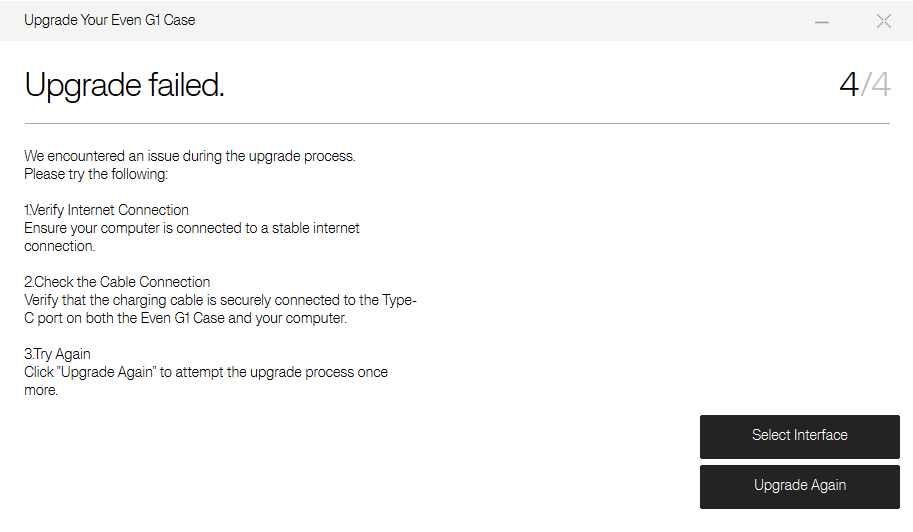
Replug the Type-C cable and repeat the above steps to check and upgrade.
For any issues, please contact Even Realities Support for assistance.
* Device Salvage for Severe Damage of Even G1 Case
** Note: The Even G1 Case should be considered severely damaged if and only if all the following conditions are met:
- The indicator light doesn't light up while repeatedly opening and closing the case cover.
- When inserting the original cable into the case, the indicator light does not illuminate.
- Even G1 fails to charge and the indicator light remains off when G1 properly placed in the case.
Solution (Compatible exclusively with Windows)
- Download the upgrade tool from https://cdn.evenreal.co/file/4bf45eab73d674ddfc6f2f9bfb30eb5a.zip.
- Unzip the .zip file and open EvenG1CaseUpgradeTool.exe inside.
- Use a cable that supports data transfer to connect your Even G1 Case with your Windows computer.
-
Follow the on-screen instructions, select the file V2.79.bin from the file path: \\EvenG1CaseUpgradeTool\Glasses case firmware, and start upgrade.
- Wait for the upgrade to complete.